Phone platforms
LIFTL
Native app for iPhone and Android
FitNotes
The original FitNotes by James Gay is Android-only
LIFTL works for individuals and households that use either mobile platform.
LIFTL vs FitNotes
The original FitNotes is a capable local-first Android workout journal. LIFTL is built for lifters who want the same fast logging idea carried across iPhone, Android, Apple Watch, Wear OS, health platforms, cloud history, desktop analysis, and deeper whole-program context.
Comparison and official sources reviewed
Disclosure: LIFTL published this comparison.
This page compares LIFTL with the original FitNotes — Gym Workout Log for Android by James Gay. FitNotes facts come from its official website and Google Play listing.* Other apps use similar names and are not evaluated here.
Why LIFTL exists
Parker built LIFTL around a specific tradeoff: keep logging fast and quiet during the workout without accepting a shallow history afterward. The phone handles the gym floor; the wider LIFTL system handles the deeper questions.
The LIFTL product principle
Feature-by-feature
LIFTL
Native app for iPhone and Android
FitNotes
The original FitNotes by James Gay is Android-only
LIFTL works for individuals and households that use either mobile platform.
LIFTL
Apple Watch and Wear OS companions for live metrics, workout controls, and rest timing
FitNotes
No smartwatch companion verified in the official sources reviewed for this page
LIFTL keeps live workout context on the wrist across both watch ecosystems.
LIFTL
Optional completed-workout write to Apple Health and Health Connect on Pro
FitNotes
No Apple Health or Health Connect integration verified in the reviewed official documentation
LIFTL connects completed lifting sessions to the phone’s broader health record.
LIFTL
Sets, reps, weight, cardio, isometrics, custom exercises, Quick Start, and saved workouts
FitNotes
Weight and reps, distance and time, custom exercises, routines, notes, supersets, and workout tools
Both are serious self-programmed logs. LIFTL extends the model across more exercise types and connected surfaces.
LIFTL
Previous sets, dedicated recent or all-time Best view, automatic timer with a session-wide override, and paired-watch countdown
FitNotes
Exercise history during logging plus automatic, per-exercise rest timing and lock-screen countdown
Both preserve gym-floor context; LIFTL adds the dedicated Best view and watch handoff.
LIFTL
Exercise trends plus workload ratio, muscle recency, rep ranges, balance, cardio, isometrics, and desktop analysis
FitNotes
Exercise graphs, estimated 1RM, rep maxes, statistics, goals, calendar filters, and body tracking
FitNotes analyzes individual records well; LIFTL is designed to connect those records into a whole-program view.
LIFTL
Opt-in LIFTLyzer notes based on rule-driven analysis of recent training
FitNotes
No equivalent verified in the official sources reviewed for this page
LIFTL has the verified feature; FitNotes status remains unverified, not asserted absent.
LIFTL
Account-based cloud history with an analysis-focused desktop portal
FitNotes
Workout data stored locally; optional device or Google Drive backup and CSV export
LIFTL keeps the phone fast while making the same retained history available for larger-screen analysis.
LIFTL
Unlimited core logging on Free; Pro funds full history, analytics, watches, health sync, portal, import, and export
FitNotes
Core Android app is free and ad-free; an optional Supporter purchase unlocks some additional exercise types
FitNotes is a standalone local app; LIFTL Pro funds a maintained cross-platform service and companion ecosystem.
The LIFTL difference
Exercise graphs are useful, and both apps have them. LIFTL goes further by connecting exercises into workload ratio, muscle-training recency, push-pull-legs balance, rep-range distribution, recovery context, cardio work, and isometric work.
LIFTLyzer can then turn recent history into opt-in, rule-driven suggestions instead of leaving every chart for you to interpret alone.
Explore LIFTL analytics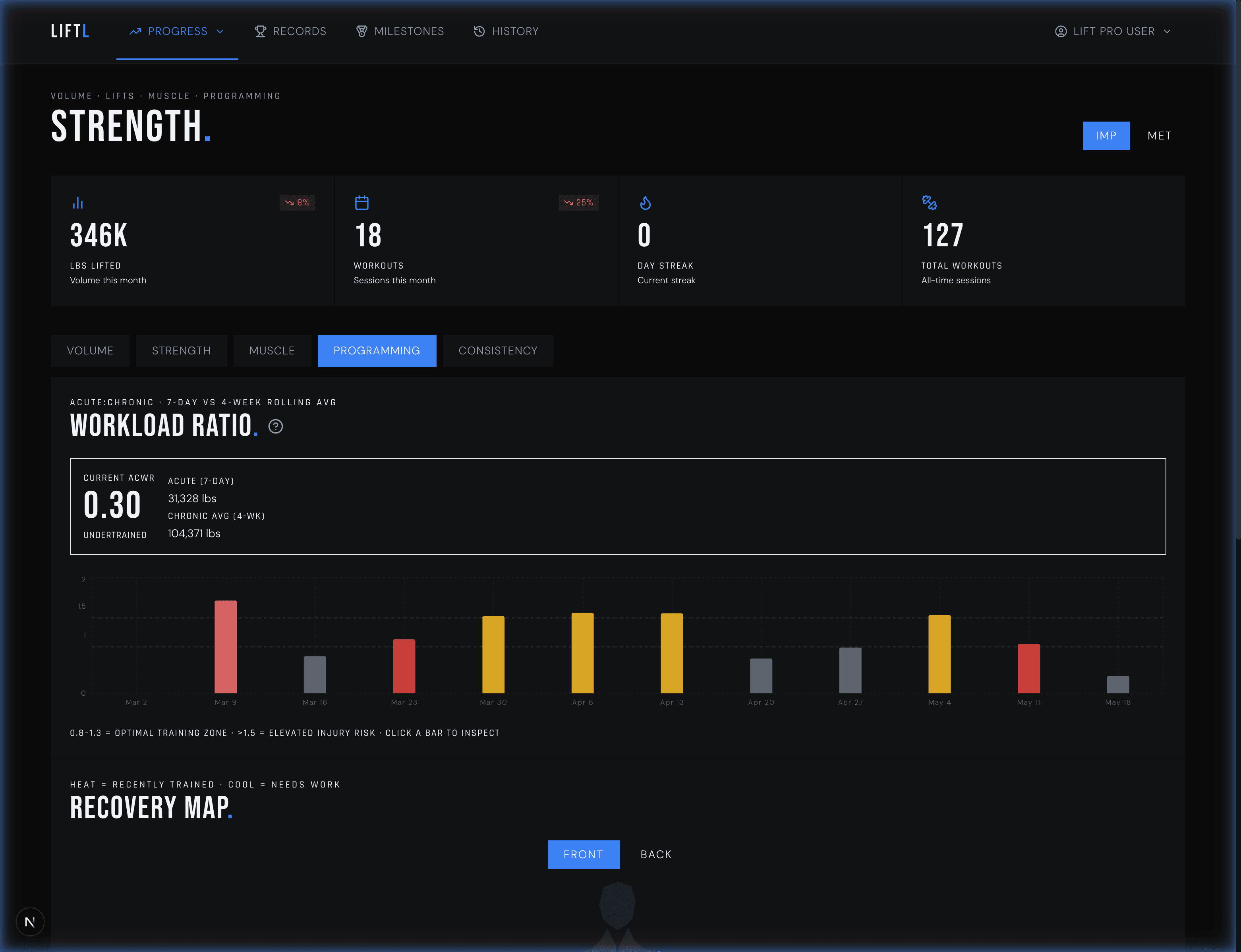
One history, more places
Use the same LIFTL account on iPhone or Android instead of committing your history to one mobile platform.
Apple Watch and Wear OS surface live metrics, workout controls, and rest timing while detailed set entry stays on the phone.
Open the desktop portal for retained history, deeper analytics, read-only history, imports, exports, and account controls.
Methodology
Feature claims were reviewed on July 21, 2026. LIFTL behavior was checked against current code and product pages. FitNotes behavior was checked only against the official FitNotes website and its Google Play listing.* “Not verified” means the feature did not appear in those official sources—not that it is definitively absent.
LIFTL vs FitNotes FAQ
LIFTL is the better fit when you want one lifting system across iPhone or Android, Apple Watch or Wear OS, platform health sync, cloud history, desktop analysis, and whole-program training insights. FitNotes is a capable local-first Android workout log. The right choice depends on whether you want a standalone Android journal or a connected training system.
This page compares LIFTL with the original FitNotes — Gym Workout Log for Android by James Gay, package com.github.jamesgay.fitnotes. Other unrelated apps use similar names.
No. Its official website says the original FitNotes is Android-only and that an iPhone version is not planned. LIFTL is available on both iPhone and Android.
Yes. FitNotes documents exercise history, progress graphs, estimated 1RM, actual rep maxes, statistics, goals, and body measurements. LIFTL adds whole-program views such as workload ratio, muscle-training recency, balance, rep ranges, cardio and isometric analytics, desktop analysis, and opt-in LIFTLyzer suggestions.
Not directly today. LIFTL Pro currently supports Hevy and Strong CSV imports. FitNotes users can export a CSV, but LIFTL does not yet accept that format. Contact support if FitNotes import is important to you; additional import support is actively being evaluated.
LIFTL published this page. FitNotes facts were reviewed against the official FitNotes website and Google Play listing on July 21, 2026. LIFTL does not claim that this is an independent review or an endorsement by FitNotes.
If you want the complete system
Start with unlimited core logging. Add Pro when you want complete retained history, advanced analysis, watches, health sync, the desktop portal, imports, and export.
Download LIFTL